Documentation
This guide explains how to install, configure, and use CloudInvoice Pro. Designed for CodeCanyon buyers: simple deployment, clean UI, and no Node/Vite dependency.
1. Introduction
CloudInvoice Pro is a modern, lightweight Invoice & Billing System built with Laravel 11. It helps manage clients, invoices, payments, PDF downloads, and company settings with a clean Bootstrap UI and Light/Dark themes.
2. Key Features
- Web installer (requirements → database → admin → finish)
- Client management (CRUD)
- Invoice creation with items, taxes, discounts
- Server-side total calculation (UI shows estimated totals)
- Invoice PDF download
- Payment tracking
- Company settings (currency, timezone, invoice prefix/padding, footer text, logo)
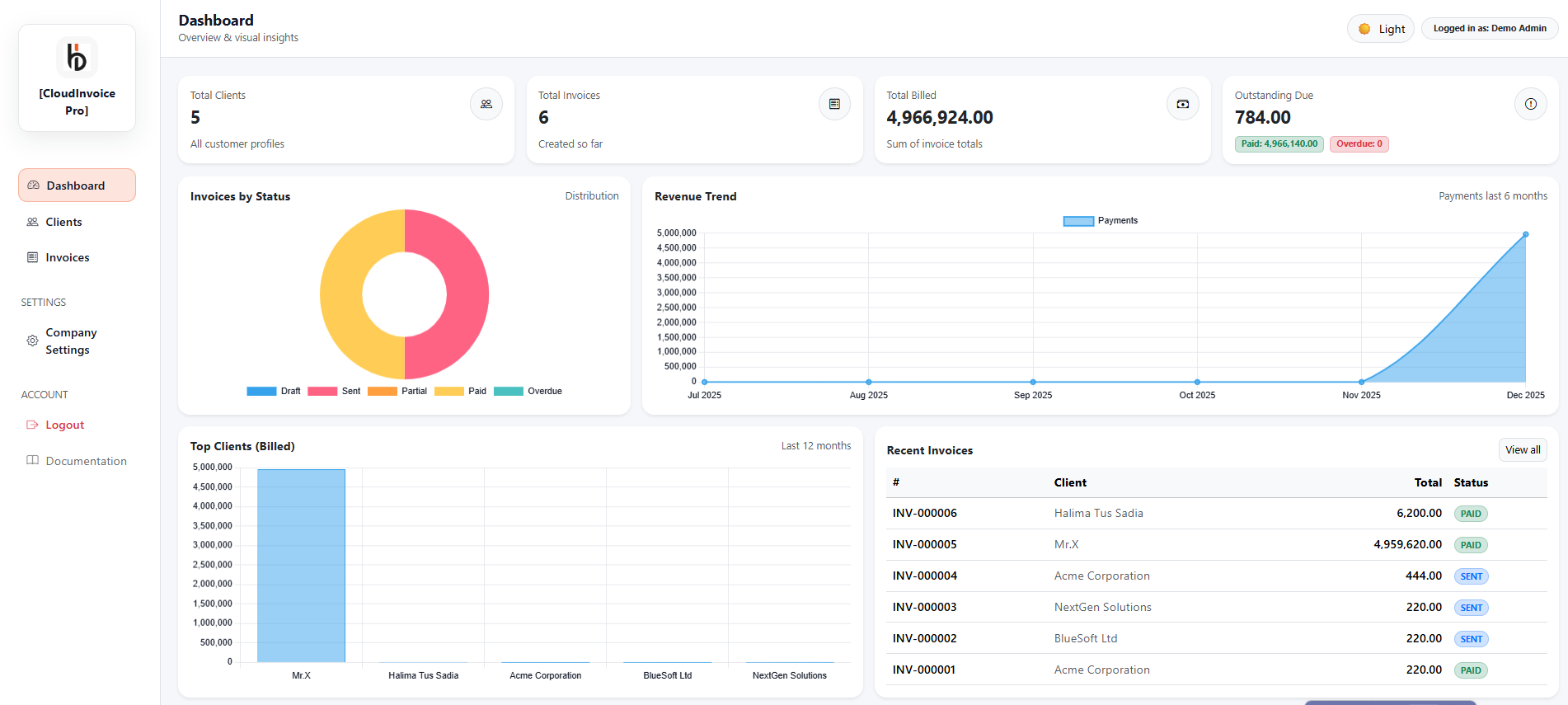
- Dashboard analytics (stats + charts)
- Light & Dark theme toggle (light default)
- Bootstrap 5 via CDN (no Vite/Node required)
3. Server Requirements
- PHP 8.2+
- MySQL 5.7+ / MariaDB 10.4+
- Apache / Nginx
- Composer enabled
- Writable:
storage/andbootstrap/cache/
storage and bootstrap/cache.
4. Installation
Step 1: Upload files to your hosting root or subdirectory.
public_html/cloudinvoice/Step 2: Create database and update .env.
APP_NAME=CloudInvoice Pro
APP_ENV=production
APP_URL=https://yourdomain.com

DB_DATABASE=your_db
DB_USERNAME=your_user
DB_PASSWORD=your_pass
Step 3: Generate app key.
php artisan key:generateStep 4: Run installer in browser.
https://yourdomain.com/install/install.
5. Login
Login URL:
/loginUse the admin credentials created during installation.
6. Dashboard
- KPI cards (clients, invoices, billed, due)
- Charts (invoice status distribution, revenue trend, top clients)
- Recent invoices table
7. Client Management
- Add / Edit / Delete clients
- Active/Inactive status
- Inactive clients can be excluded from invoice selection (optional behavior)
8. Invoice Management
| Status | Meaning |
|---|---|
| Draft | Invoice created but not sent |
| Sent | Sent to customer |
| Partial | Partially paid |
| Paid | Fully paid |
| Overdue | Past due date |
9. Payments
- Add payments to invoices
- Partial or full payments supported
- Dashboard revenue trend uses payment records
If your payments table uses created_at instead of payment_date, dashboard queries should use created_at.
10. Company Settings
- Company profile (name, email, phone, address, tax/VAT)
- Invoice settings (currency, timezone, prefix, padding, default tax)
- Invoice footer text
- Company logo upload (recommended PNG)
11. Theme (Light / Dark)
- Light theme is default
- Toggle saves preference in
localStorage - Bootstrap dark overrides included in
public/assets/css/app.css
12. File Structure
app/
  Http/Controllers/
  Models/
resources/views/
  layouts/
  dashboard/
  clients/
  invoices/
  settings/
public/assets/
  css/app.css
  images/
database/migrations/
13. Customization
- Brand colors: edit
public/assets/css/app.css - Logo: upload in Company Settings (and/or replace
public/assets/images/logo.png) - Invoice PDF layout: update
resources/views/invoices/pdf.blade.php
14. Security Notes
- Installer locked after installation
- CSRF enabled
- Form validation on all modules
- Server-side invoice calculations
15. Support & Troubleshooting
Log file
storage/logs/laravel.logClear cache
php artisan optimize:clear16. Credits
- Laravel Framework
- Bootstrap 5
- Chart.js
- PDF Library (your implementation: DomPDF/TCPDF/etc.)
17. Changelog
| Version | Date | Notes |
|---|---|---|
| 1.0 | 18-12-2025 | Initial release |